Integration Details

QR Menu and Contactless Ordering
One QR code, order from the table

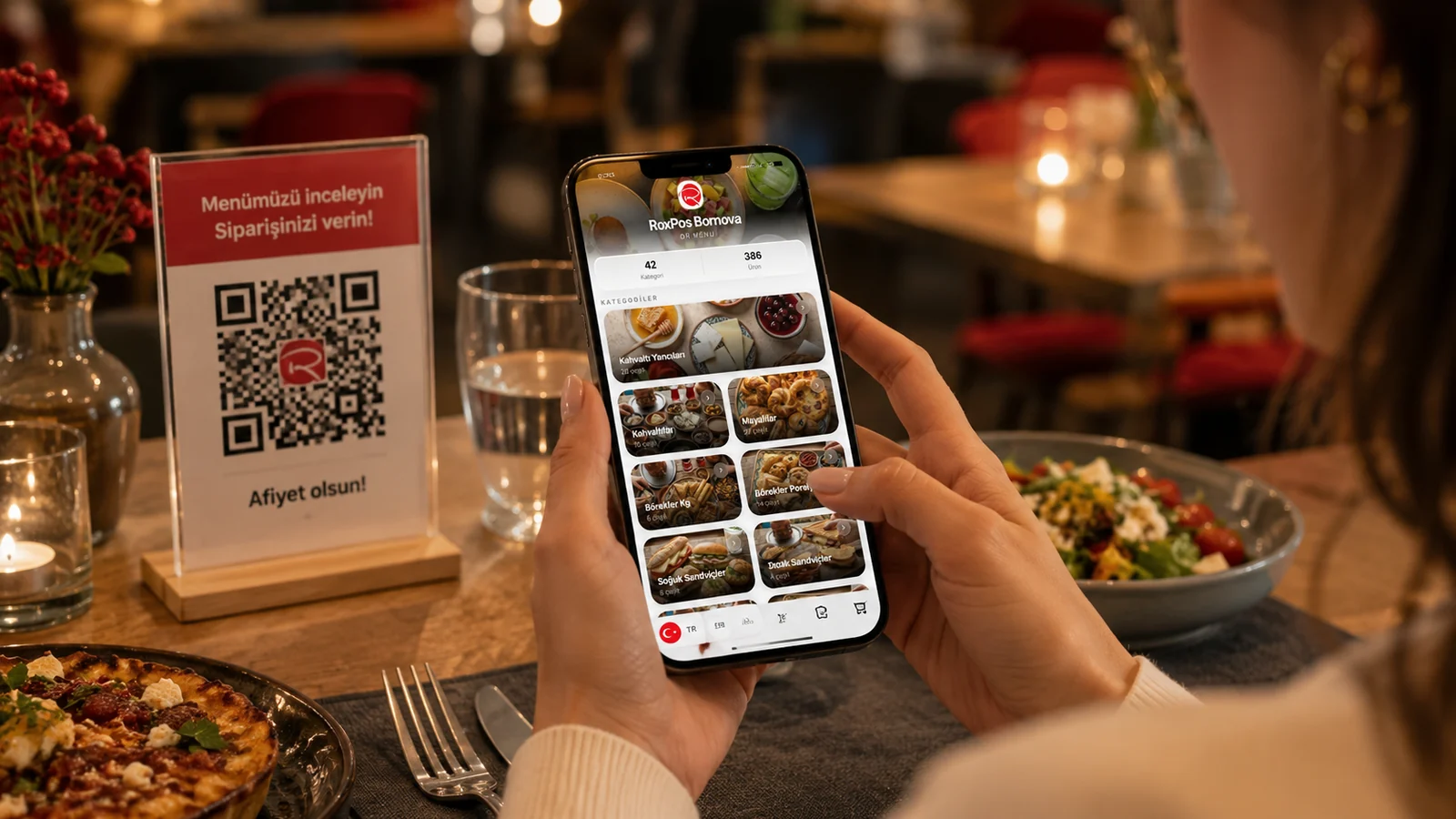
Guests scan the QR code at the table, browse a multilingual menu and their cart drops straight onto the check. Includes waiter call, product photos and allergens.

QR Menu and Contactless Ordering

Key Highlights

Multilingual menu (TR/EN/DE/ES) — guests browse in their own language.

The QR menu is presented in four languages — Turkish, English, German and Spanish — and the guest switches to their own language with a single tap. Category names, item descriptions and prices all appear in the chosen language, so foreign visitors can browse the menu comfortably without asking staff. This removes the language barrier and speeds up the ordering process.

Cart and order drop straight onto the check; kitchen/cashier see it instantly.

As soon as the customer confirms their cart, the order is sent into the system linked to their table and shows up on the staff screen as an order awaiting approval. Once the waiter approves it, the items are written onto the table's check and preparation begins; because the step of a waiter typing the order from scratch is removed, transcription errors are reduced. This way the order is delivered quickly while still passing through a single-tap check before service.

Waiter-call button — the request reaches staff with the table number.

When the customer taps and confirms the call-waiter button in the menu, an instant notification reaches the team along with the number of the table they are sitting at. Because staff see directly who is asking for help and from which table, there is no need to scan the floor in vain. This ensures the service request reaches the right person quickly and shortens the guest's waiting time.

Product photos and allergen/ingredient info shown on every item.

On every menu item, the product image, its description and its ingredients are presented together, so the guest clearly sees what they are ordering. The image-supported presentation helps them choose unfamiliar dishes with more confidence and place an order that matches their expectations. Listing the ingredients openly gives guests who want to know what they are consuming the chance to make an informed choice.

What Does This Integration Deliver?

Taking orders without depending on a waiter during rush hours

During busy hours when the dining room is full, guests can scan the QR code at their table and build their cart themselves, so they don't have to wait for a waiter to come to the table to place an order. Because the order lands in the system instantly and appears on the staff screen as an item awaiting approval, even a limited number of staff can serve more tables at the same time and the service flow does not get clogged.

Offering foreign guests a menu in their own language in tourist areas

A business operating in a tourist area can offer foreign guests a menu in English, German or Spanish thanks to the four-language QR menu, without depending on staff speaking a foreign language. Because the guest reads item descriptions and prices in their own language and orders accordingly, misunderstandings are reduced and the welcome experience leaves a professional impression.

Publishing menu and price changes instantly with no printing cost

Because it is a digital QR menu, adding a new item, updating a price or hiding a sold-out dish is done instantly, and the change reflects on all tables at the same moment. Since the business no longer has to reprint menus for every price or campaign change, it is freed from printing costs and can keep its menu up to date at all times.

Reducing service errors and wait times with self-service ordering

When the guest selects and confirms their own order, the chance of a waiter mishearing it and recording it incompletely or incorrectly disappears, and the requested items are passed into the system correctly. Because the order lands in the system instantly and appears on the staff screen, approval and preparation begin earlier, so the waiting time at the table shortens and guest satisfaction rises.

Related Solutions

Frequently Asked Questions

How does the QR menu work?

Each table gets its own QR code. When a guest scans it, the menu opens with no app install; they add to cart and send the order, which drops straight onto that table's check.

Does the guest need to install an app?

No. The QR menu opens in the browser; no app or sign-up is required.

Is the menu multilingual?

Yes. The menu can be served in TR/EN/DE/ES; guests pick their language and item names and descriptions appear in it.

Can I add allergens and product photos?

Yes. You can add a photo, ingredients and allergen info to each item; these appear in the item detail on the menu.